
A Google Business Profile is a free listing that lets eligible businesses control how they appear on Google Search and Google Maps. According to Google’s own Business Profile overview, it allows businesses to add essential information, share updates, manage photos, and respond to customers directly across Search and Maps.
A Business Profile isn’t a replacement for a professional website or good customer service it’s a core part of your local marketing system. For many customers, it’s the first impression your business makes, so accuracy, useful content, genuine reviews, and professional presentation matter from the very first search.
Table of Contents
What Is a Google Business Profile?
A Google Business Profile formerly Google My Business is a business listing that appears when people search for your company by name or look for services in a particular area.
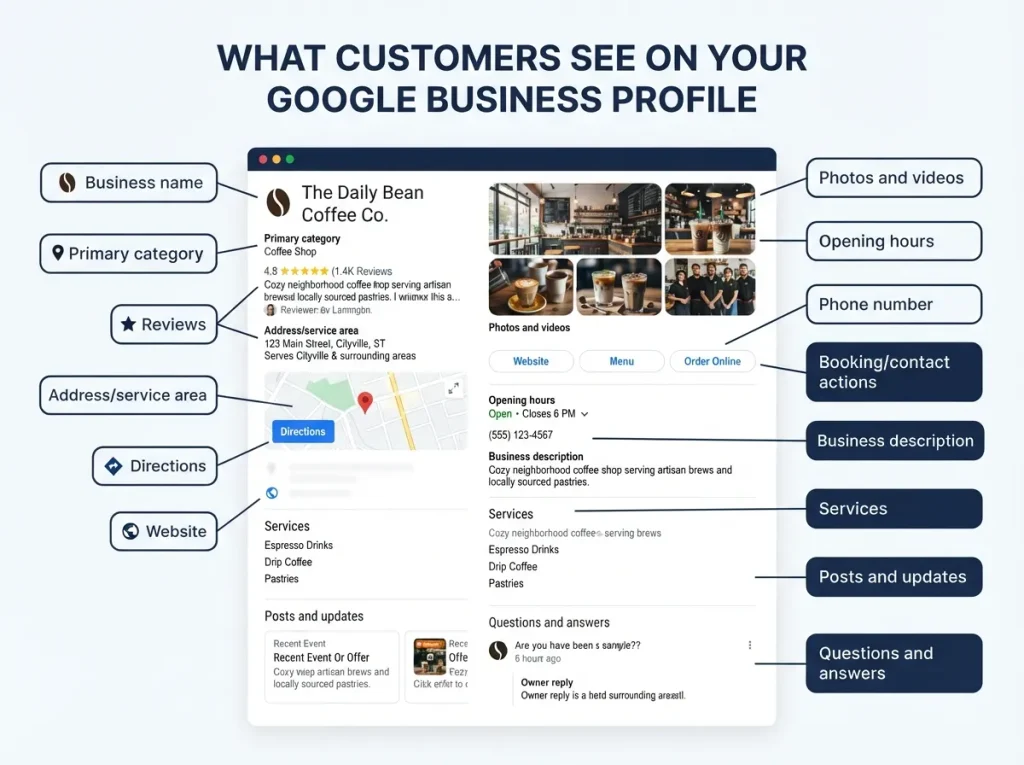
Depending on the search, your profile may display:
- Business name and primary category
- Address or service area
- Phone number and website link
- Opening hours, including holiday or special hours
- Photos and videos
- Customer reviews Services or products offered
- Business description
- Questions and answers
- Posts, offers, and updates
- Booking, ordering, or appointment links
- Directions and other customer actions
For example, someone might search “plumber near me” or “hair salon in New York.” Google’s local results can show several businesses at once, each with a name, rating, location, hours, photos, and one-tap actions like calling or visiting the website.
In other words, a potential customer may interact with your Google Business Profile before ever reading a page of your website. An incomplete or inconsistent profile creates hesitation. An accurate, well-maintained one makes contacting your business effortless.
Why Google Business Profile Matters for Local SEO
It Improves Local Discovery
A Business Profile gives Google the information it needs to surface your business when people search for relevant local products or services.
Google doesn’t guarantee every business will appear for every search local visibility depends on relevance, distance, prominence, competition, and the accuracy of your listing. But claiming and maintaining an eligible profile is the essential foundation for local search visibility. (For a deeper, hands-on walkthrough of turning a profile into a ranking asset, see our GMB Optimization service.
It Builds Customer Confidence
People want to know whether a business is legitimate, active, and right for their needs. A complete profile answers the questions that matter most, quickly:
- What does the business do?
- Where is it located, and does it serve my area?
- When is it open?
- How can I contact it?
- What do previous customers say?
- Does it look professional and active?
It Creates Direct Customer Actions
A profile helps customers call, visit your website, request directions, send a message, or book an appointment moving them from searching to engaging.
Local searchers often have strong intent. Someone searching “emergency electrician near me” isn’t looking to read a long article they want to call immediately. Your profile should make that action as simple as possible.
It Supports Reputation Management
Reviews are one of the most visible parts of a Business Profile, and Google specifically gives businesses the ability to respond to reviews publicly, which helps create a more informative, professional presence.
Review management doesn’t mean eliminating legitimate criticism it means listening to customers, responding respectfully, identifying recurring problems, and improving where it counts. This is exactly the discipline behind our GMB Reputation Management service.
Who Is Eligible for a Google Business Profile?
Not every business qualifies. Generally, a business must make in-person contact with customers during its stated hours this includes businesses with a physical location and service-area businesses that travel to customers.
Typically eligible:
- Restaurants and cafes
- Retail stores
- Medical and dental practices
- Salons and barbers
- Repair companies and contractors
- Cleaning services
- Professional offices
- Gyms and training studios
- Local agencies with customer-facing premises
- Service-area businesses that visit customers
Typically not eligible
Online-only businesses, rental properties, vacant locations, and certain lead-generation businesses. Google’s eligibility guidance states that only business owners or authorized representatives should verify and manage a profile. Before creating one, confirm your business meets Google’s eligibility requirements duplicate or misleading listings can cause problems with visibility, verification, or account access.
How to Set Up a Google Business Profile
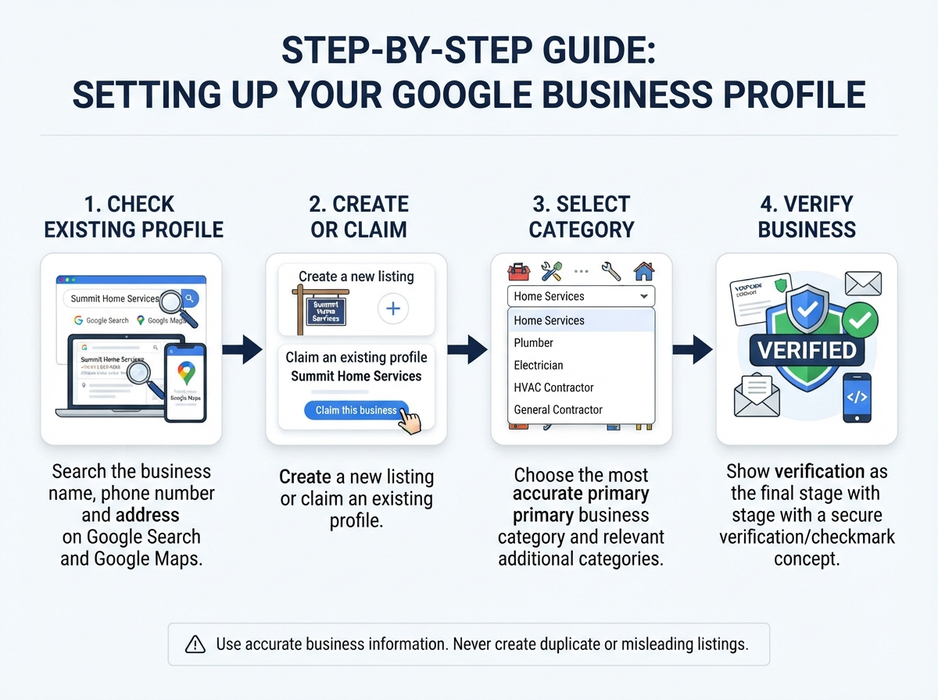
1. Check Whether a Profile Already Exists
Search Google and Google Maps for your business name, phone number, and address a profile may already exist even if you didn’t create it. If one does, claim it rather than creating a duplicate. Google’s guidelines recommend maintaining one profile per business in most cases.
2. Create or Claim Your Profile
Use Google’s official process to create a new listing or claim an existing one, providing accurate information:
- Official business name
- Business category
- Address or service area
- Phone number and website
- Opening hours
- Services
Your business name should match how it’s represented in the real world — avoid adding keywords, slogans, locations, or promotional phrases to influence rankings.
3. Choose the Right Business Category
Your primary category tells Google and customers exactly what your business does. Choose the most accurate primary category, then add only genuinely relevant additional categories.
A dental clinic, for example, shouldn’t select unrelated categories just because they have high search volume the category should reflect the business’s actual core activity.
4. Complete Google Business Profile Verification
Google may verify your business by video, phone, email, or another method it selects. Verification reviews can take up to five business days in some cases, though many profiles verify faster.
Only the business owner or an authorized representative should complete verification never share verification codes with unknown individuals.
Essential Information to Include in Your Profile
Accuracy comes before promotion. Review every field carefully.
Business Name
Use your real-world business name only. Don’t add phrases like “Best Local SEO Agency” unless that’s genuinely part of your registered, customer-facing name.
Address and Service Area
Use an accurate address for location-based businesses, and clearly define the areas you actually serve for service-area businesses. Never use a virtual office, PO box, or inaccurate location to fake a local presence Google’s guidelines require business information to represent the real business accurately.
Phone Number and Website
Use a number customers can actually reach and a website that represents the business. Keep these details consistent across your website, directories, social profiles, and any other public reference.
Business Hours
Add standard hours and update special hours for holidays, closures, or unusual schedules. Incorrect hours are a fast way to create a frustrated customer.
Business Description
Explain who you serve, what you offer, and what makes your business genuinely useful — without excessive keyword repetition or unsupported claims.
Example:
We provide residential plumbing repairs, leak detection, water heater servicing, and emergency plumbing support for homes and small businesses in [service area]. Our team focuses on clear communication, practical recommendations, and dependable appointments.
This is far more useful — and more trustworthy — than repeating “best plumber in [city]” several times.
How to Optimize Your Profile with Photos, Services, and Posts
Add Authentic Photos
Photos help customers understand your business before they ever contact you. Useful images include exterior signage, your storefront or reception, team members, the work environment, products, completed projects, vehicles or equipment, and before-and-after examples where relevant. Google confirms photos and videos become visible on Search and Maps once a profile is verified avoid stock images that could confuse customers about who you really are.
List Your Services Clearly
Clear service names and short descriptions help customers understand exactly what you provide. Include starting prices if appropriate, but never misleading ones. A local marketing agency’s services list, for example, might include Google Business Profile optimization, local reputation management, review response management, local citation management, local SEO content, and social media content creation.
Publish Useful Google Posts
Google Business Profile posts let you share announcements, offers, events, and updates directly on Search and Maps. Strong post ideas include a new service, seasonal hours, a helpful customer tip, a recent project, an upcoming event, a common question, a booking reminder, or a community activity. Publish genuine updates repeating the same thin promotional message adds little value.
How to Manage Google Reviews the Right Way
A strong review process starts with a good customer experience the goal is honest feedback, not a specific rating. A responsible review process should:
- Ask genuine customers for feedback after a real interaction
- Make the invitation clear and easy to act on
- Never pressure customers toward a specific rating
- Never create fake reviews
- Never buy reviews
- Never offer prohibited incentives
- Never selectively ask only happy customers to review
- Respond professionally to both positive and negative feedback
- Protect private customer information in public responses
- Use recurring feedback to improve real operations
Google takes fake and incentivized reviews seriously policy violations can lead to restrictions, including a temporary inability to receive new reviews.
Responding to a positive review:
Thank you for sharing your experience, Sarah. We’re glad our team could help with your home renovation project, and we appreciate your recommendation.
Responding to a negative review:
We’re sorry to hear that your experience did not meet expectations. We take this feedback seriously and would like to understand what happened. Please contact our team directly so we can review the situation with you.
Common Google Business Profile Mistakes to Avoid
- Using an inaccurate business name
- Creating duplicate profiles
- Choosing irrelevant categories
- Leaving outdated hours unchanged
- Uploading misleading photos
- Ignoring reviews
- Adding keywords unnaturally
- Publishing low-quality or repetitive posts
- Using an address where the business doesn’t actually operate
- Expecting immediate rankings
- Giving account access to unauthorized people
- Making unsupported guarantees
Google’s guidelines are consistent on this point: business information should accurately represent the real business, use a precise address or service area, and select only the categories genuinely needed to describe the core business.
How to Maintain and Improve Your Profile Over Time
Treat your Google Business Profile as an ongoing asset, not a one-time setup task. A simple monthly routine should include:
- Checking business hours and contact details
- Reviewing new customer feedback
- Responding to reviews
- Adding relevant photos
- Publishing a useful update when appropriate
- Reviewing profile actions calls, website visits, direction requests
- Checking for new customer questions
- Comparing profile information against your website and key directories
- Identifying service or content gaps
The goal isn’t to fill the profile with unnecessary activity it’s to keep information current, useful, and aligned with the real customer experience.
Frequently Asked Questions About Google Business Profile
Is Google Business Profile free?
Yes. Creating, verifying, and managing a Google Business Profile is free Google does not charge for a standard listing.
How long does Google Business Profile verification take?
Verification methods vary by business, but Google notes reviews can take up to five business days in some cases, with many profiles verifying faster.
Can I have more than one Google Business Profile for the same business?
Generally No. Google’s guidelines recommend one profile per business location to avoid duplicate-listing issues that can hurt visibility.
Does responding to reviews affect local ranking?
While Google hasn’t confirmed response rate as a direct ranking factor, an actively managed profile with regular responses is a strong trust and engagement signal to both customers and Google.
How often should I update my Google Business Profile?
At minimum, monthly checking hours, responding to new reviews, and adding fresh photos or posts keeps the profile accurate and signals an active business.
Overview
Google Business Profile is one of the most important foundations of local online marketing. It helps eligible businesses appear in front of nearby customers, communicate essential information, showcase real-world experience, and create direct actions like calls, visits, bookings, and website clicks.
But the profile itself can’t compensate for poor service, inaccurate information, or misleading marketing. The strongest results come from combining an accurate profile with a useful website, genuine reviews, professional responses, quality photos, and a consistent customer experience.
Start with the basics: claim the correct profile, complete every relevant section, verify the business, use accurate information, add authentic photos, list your services, and respond to customers respectfully. Then review and improve it regularly.
A well-managed Google Business Profile doesn’t just help people find your business, it helps them understand why your business is the right choice. If you’d rather have this handled for you, see our GMB Optimization and GMB Reputation Management services.