
Someone in the vicinity takes out their phone and searches Google for “coffee shop near me” or enters your company’s name. They see a name, a star rating, a few pictures, an “Open now” badge, and buttons for phoning and directions before they reach a website. Whether a client walks in or moves on to the next result is determined by this card that appears directly within Google Search or on Google Maps.
That panel is your Google Business Profile. For many local searches, it’s the first impression a customer receives of your business, and this is the only one point before they decide to visit, call, or scroll past. This useful tutorial covers what a Google Business Profile is, what appears on it, how it fits into local search, and how to develop and maintain one that works in your favor.
Table of Contents
What Is a Google Business Profile?
A Google Business Profile is a free listing that allows a business to manage how it appears in Google Search and Google Maps. It’s the technology that drives the map pack, the star rating, the “Open now” label, and the photo carousel that show up when someone searches for a company by name or by category like “bakery” or “dentist near me” or “24-hour pharmacy.”
This is a Google product that used to be called Google My Business. Later Google renamed it Google Business Profile in 2021, and while plenty of people (and plenty of older articles) still say “GMB,” Google Business Profile is the current name.
Who can build GBP?
These profiles aren’t meant for every kind of business. Google’s own guidance is that they’re built for companies that interact with customers in person: a shop with a shopfront, a plumber who drives to a customer’s home, and a clinic people walk into. Businesses that operate entirely online, and listings for property that’s for sale or rent, aren’t eligible.
In practice, that covers most local businesses: restaurants, clinics, salons, repair shops, contractors, gyms, and law firms. If a customer might search for you by category or location, a business profile is how you show up in that search.
Why Google Business Profile Matters for Local Businesses
A well-maintained profile changes what happens in the moments before a customer decides to engage with you.
GBP Appearance
It’s often seen before your website is. In local search results, the map pack and business panel tend to appear above the standard list of website links. A customer can check your hours, analyze a few reviews, and confirm your rating without ever clicking through to your site.
GBP Value
It builds trust quickly. A strong rating with a healthy number of recent reviews and real photos reads as active and legitimate. A 4-star rating built on 150 reviews from the past year tells a very different story than the same rating built on 12 reviews from four years ago, even though the star count looks identical at a glance.
GBP Contact Showcase
It removes friction between discovery and action. Directions, phone calls, and website visits are all one tap away, right inside the search result, so a customer doesn’t have to hunt for your address or copy a number into their phone.
Importance
It helps people who don’t know your name yet find you. Someone searching “vegan bakery” isn’t looking for you specifically; they’re looking for a category, and a complete profile is what makes it possible for your business to show up in that kind of search.
None of this guarantees a sale. A profile can get someone to call or walk in, but what happens after that is still up to the business. It’s better understood as removing obstacles to that first contact than as a substitute for good service or a solid product.
What Customers Can See on a Google Business Profile
When someone finds your listing on Search or Maps, here’s roughly what’s in front of them:
- Business name and category: what you’re called and what kind of business you are
- Star rating and review count; with the ability to read individual reviews
- Hours, including whether you’re open right now, plus any special hours you’ve set for holidays
- Address or service area with a directions button
- Phone number: with click-to-call on mobile
- Website link: digital fingerprint
- Photos and videos; both what you upload and what customers add themselves
- Business description: a short summary of what you do
- Products and services: sometimes with prices, if you’ve added them
- Post: short updates about offers, events, or news
- Attributes: small tags like “wheelchair accessible” or “outdoor seating”
- Booking or ordering links for businesses: in eligible categories
Two things to watch for if you’ve been running a company profile for a while because they just updated. Google is sunsetting the old Questions & Answers feature, where customers could post questions and anyone could answer them. The underlying API was discontinued by Google in November 2025, and the public section began being phased out the following month.
Replaced by an AI-generated “Ask” feature in Maps, it pulls answers from your profile, reviews, and website. Google also killed direct messaging via Business Profile, the chat function that allowed customers to message a business directly from Search or Maps, in mid-2024. The other contact options include phone, online, and, in certain accounts, SMS or WhatsApp.
How Google Business Profile Works
The working is simple, even if the ranking behind them isn’t.
A business builds and validates a profile and confirms to Google that it is the legitimate owner. From there, it adds info: category, hours, photographs, description, and services. It combines that with its own signals, geographical data, review activity, and how the profile has performed over time to determine when and where to show it. If someone searches for anything nearby (that is relevant), Google checks the pool of eligible profiles and shows them what it thinks is the best match.
The consumer views the outcome, determines whether it is reliable and pertinent, and then decides whether or not to make a call, request directions, click on a website, or scroll past. Google keeps track of those interactions and feeds them back through the Performance tab (formerly known as Insights) of the profile, which displays how users found the listing and what they did after arriving.
It’s important to pay attention to that feedback loop. You don’t just fill out a profile and walk away; it reacts to continuous cues like new images and reviews, and you can use the performance data to determine whether the adjustments you’ve made are really working.
Essential Google Business Profile Information
Some fields carry more weight than others, either because Google leans on them to match search queries or because they’re what a customer checks first.
Business name. Use your real name exactly as it appears on your signage and website. Google’s guidelines explicitly prohibit stuffing keywords or locations into this field; something like “Smith Plumbing Emergency 24/7 Chicago” instead of “Smith Plumbing” is a violation that can get a profile suspended.
Address or service area. Storefront businesses show a public address. Businesses that travel to customers, cleaners, electricians, and caterers are expected to hide their address and set a service area instead, using up to 20 defined cities, postcodes, or regions.
Phone number. A local, direct number tends to work better than a call-center line, both for customer trust and for consistency across other directories.
Website. Link to whichever page is most useful to you, sometimes that’s a location page or booking page rather than the homepage.
Hours. Keep regular hours current and set special hours ahead of holidays or closures. Few things frustrate a customer faster than showing up to a business listed as open that isn’t.
Category. Pick the primary category that most precisely describes the main thing you do, and add secondary categories for anything else relevant. A business listed only under a broad category is giving Google less to work with than one under a specific match for what people actually search.
Description. You get 750 characters, but only the first 250 or so display before a customer has to click “Read more.” Use that opening stretch to say what you do, who you serve, and what sets you apart, and save supporting detail for the rest. Google doesn’t allow HTML, links, or promotional pricing in this field; that belongs in Posts instead.
Photos. Google recommends photos around 720 by 720 pixels, with a 250 by 250 minimum, in JPG or PNG format. An exterior shot helps customers recognize your location when they arrive, and category-specific photos, your dining room, your treatment rooms, and your shelves give people the visual context they use to decide whether to visit.
Products and services. Listing what you actually sell, with specific names and prices where it makes sense, gives customers a reason to click through and gives Google more to match against relevant searches.
How to Build a Stronger Google Business Profile
If you’re starting from a thin or neglected profile, here’s a sensible order to work through:
- Claim and verify your profile. Depending on your business and location, Google may offer verification by phone or text, email, a short video recording, a live video call, or a postcard mailed to your address. Use whichever option Google presents to you.
- Fill out every core field completely: name, category, hours, address or service area, phone, and website. An incomplete profile is easy for both Google and customers to pass over.
- Write a description that leads with the most useful information in the first 250 characters, since that’s what shows by default.
- Upload real photos, starting with a clear exterior shot and a handful of interior or product photos, and keep adding new ones rather than uploading a batch once and stopping.
- List your products or services with specific names; “Brake pad replacement” tells a customer more than “Auto services.”
- Publish posts for offers, events, or updates. They don’t directly move your ranking, but they keep the profile looking active and give customers a reason to check back.
- Set your service area correctly if you’re a service-area or hybrid business, and revisit it as your coverage changes.
- Ask for reviews and respond to the ones you get, positive and negative, without offering anything in exchange. Google’s policy bans incentivized reviews and “review gating,” where a business only asks its happiest customers for feedback.
- Check your performance data every few weeks to see which searches bring people to your profile and what they do once they get there.
Common Google Business Profile Mistakes
A few patterns show up again and again on neglected or poorly managed profiles:
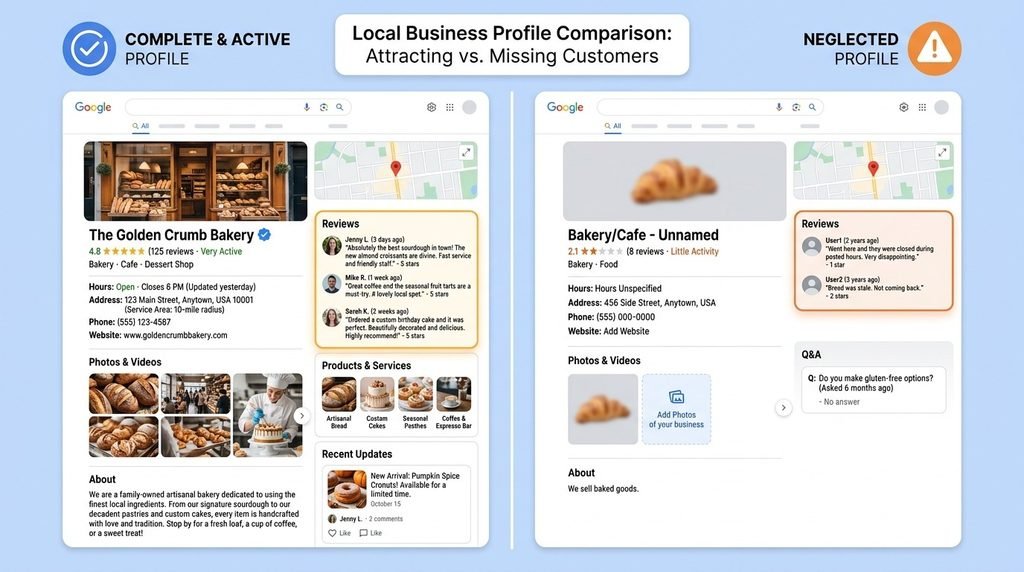
- Incomplete information: missing hours, no phone number, no description. Each gap is a reason for a customer to pick a competitor instead.
- Inaccurate information. A wrong address or a disconnected phone number does more damage than a thin profile, because it actively misleads someone who’s already decided to visit.
- Outdated hours around holidays are one of the most common and most avoidable mistakes here.
- Poor-quality or generic photos, including stock imagery or a single logo image that gives customers nothing real to evaluate.
- Keyword stuffing the business name, which violates Google’s guidelines and risks suspension.
- Ignoring reviews, especially negative ones, which reads as indifference to anyone reading them later.
- Inconsistent information across the web: if your name, address, or phone number differs between your site, your profile, and other directories, it confuses both customers and Google.
- Treating the profile as a one-time setup task. A listing filled out once and never touched again tends to look and perform worse over time than one that gets small, regular updates.
Google Business Profile and Local SEO
Relevance, distance, and prominence are the three primary variables that Google has openly said determine local results (the third factor is also referred to as “popularity” in Google’s own help literature).
Relevance is how well your profile matches what someone searched for. A complete, accurately categorized profile with a clear description gives Google more to match against a query.
Distance is how far your business is from the person searching or from the location implied in their search. This isn’t something you can control directly; you can’t move your shop closer to every customer, though an accurate address or service area at least ensures Google is measuring the right distance to begin with.
Prominence reflects how well-known and well-regarded your business is, both on Google and elsewhere. Reviews, mentions from other sites, and general online visibility all feed into it.
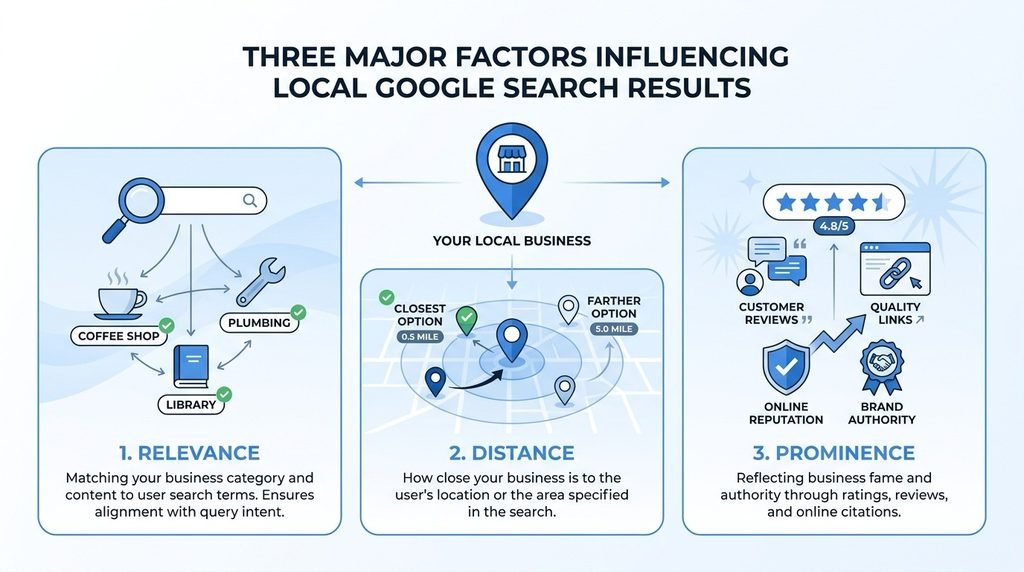
It’s important to be clear about what this means and doesn’t. Five more reviews, improved descriptions, fresh images, and no changes at all ensure a ranking increase. Together, these elements are evaluated against the actions of all local rivals, and Google does not disclose the precise methodology. A comprehensive, active, and well-reviewed profile does not eliminate the competition; rather, it strengthens your position within it.
Another change to be aware of is that Google is increasingly using descriptions, reviews, and categories from business profiles to power AI-generated responses in Maps and Search, taking the place of more traditional sections like the Q&A section. Because an AI feature uses this information to directly answer a customer’s question, accuracy and completeness become important outside of the standard map pack.
Google Business Profile vs. a Business Website
These two often get treated as interchangeable, but they do different jobs.
Google Business Profile
Your company profile is a snapshot of trust and discovery. It is created by Google, formatted according to Google’s guidelines, and has limited customization options. Custom branding, checkout, and formatting beyond what the platform permits are all prohibited. Putting your essential information in front of someone who is already looking nearby is one of its strengths.
Website
Your website is where you control the full experience. You can tell a longer story, showcase a full catalog, take bookings or payments directly, publish content that builds search visibility over time, and build a relationship that goes beyond a single visit.
Duo value to business
Rather than acting as stand-ins for one another, they function best when together. The website is typically where that step goes and where a more thoughtful decision is made; the profile typically does the work of getting a nearby customer to notice and trust you enough to take a first step.
How to Maintain Your Profile
Once the initial setup is done, a light, regular routine keeps a profile from sliding back into “incomplete” or “outdated” territory.
Things to check
- Check hours monthly, and update special hours ahead of any holiday or planned closure.
- Respond to new reviews within a few days rather than letting them pile up.
- Add a few new photos every month or two: recent work, seasonal changes, new products instead of relying on a set uploaded years ago.
- Review your category and services list quarterly, especially after adding or dropping offerings.
- Check the Performance tab periodically to see whether search terms and customer actions are shifting.
- Audit your information for consistency across your site and other directories a couple of times a year.
None of this needs to take long once it becomes a habit. The profiles that struggle most tend to belong to businesses that set them up once and never came back, not to businesses without a marketing department.
Frequently Asked Questions
What is a Google Business Profile?
It’s a free listing that controls how a business appears on Google Search and Google Maps, including its name, hours, address or service area, reviews, and photos. It’s the source behind the map pack and the business panel that appears when someone searches by name or category.
Is Google Business Profile free?
Yes. Creating, verifying, and managing a business profile costs nothing. Google offers separate paid products, like Google Ads, that can appear alongside organic local results, but the profile itself is free.
Does every local business need one?
Most businesses that interact with customers in person benefit from having one, whether that’s a storefront or a service that travels to customers. It’s not meant for online-only businesses or for listings of property that’s for sale or rent.
Does Google Business Profile help local SEO?
It’s one part of local SEO, not all of it. A complete, accurate, active profile supports the relevance and prominence factors Google uses in local rankings, but it works alongside reviews and website content rather than replacing them.
Can I manage my profile from Google Search?
Yes. You can find and manage your business profile directly from Search or Maps by searching your business name while signed into the account that manages it, without needing a separate app for most tasks.
What information should I add first?
Start with what customers rely on most: accurate hours, a working phone number, your correct address or service area, and your primary category. Then add a description, photos, and your products or services.
How often should I update my profile?
There’s no fixed schedule, but checking hours monthly, adding photos every month or two, and responding to reviews as they come in keeps a profile from going stale. Treat it as an ongoing channel, not a one-time task.
Can a service-area business use Google Business Profile?
Yes. Service-area businesses, cleaners, electricians, mobile repair services, can set up a profile that hides their public address and instead shows the areas they serve, up to 20 defined regions.
Can customers find my business through Google Maps?
Yes, assuming your profile is verified and includes an accurate address or service area. Search and Maps draw from the same underlying profile data, so a well-maintained listing shows up in both.
What should I do if my information is wrong?
Sign in to your business profile and correct the field directly, most changes to hours, phone number, or description reflect quickly. If you don’t have access, you can request ownership through Google’s verification process.
Overview
A Google Business Profile is neither a quick fix for ranking nor a set-it-and-forget listing. Imagine it as a storefront window that Google controls the shape of: what you put in it, accurate hours, genuine images, a clear description, and sincere interaction with reviews determines whether or not a bystander chooses to enter.
Businesses that make the most of their profile typically perform a few unglamorous tasks on a regular basis: maintain accurate information, update their images more than once a year, and reply to reviews rather than disregard them. None of that ensures a high ranking or an influx of new clients. It ensures that when someone in the area is already searching for what you have to offer, your profile provides them with a precise, up-to-date reason to pick you over the next result down.
Want Reputation management, optimize your Profile connect with us at www.localseo.click